Xem, giám sát I/O ổ cứng trên linux: CentOS bằng dòng lệnh (how to monitor disk I/0 Linux)
Để theo dỏi và giám sát các truy xuất I/O của ổ cứng bạn có thể sử dụng lệnh sau:
Monitor disk I/O on per-process basis
1. Cài đặt iotop
$ yum -y install iotop
2. Giám sát I/O bằng lệnh
$ iotop
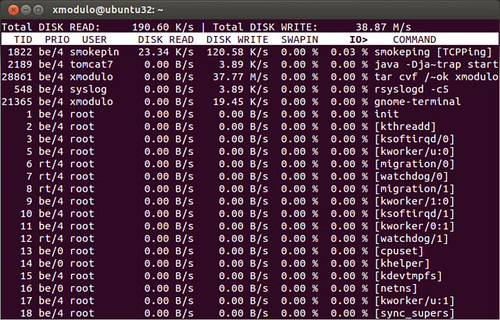
Lênh trên sẻ giám sát hết các task liên quan đến I/O
Nếu bạn muốn chỉ giám sát các task liên quan thật sử đến I/O (các task thật sử đang truy xuất I/O) thì dùng lệnh sau
$ iotop -o
Để giám sát I/O của từng ổ cứng bạn sử dụng sysstat sau:
1. Cài đặt
$ yum -y install sysstat
2. Giám sát bằng lệnh
$iostat
$iostat <update_interval_in_seconds> (lệnh dưới cho phép chạy 10 lần, mỗi lần cách nhau 2 giây)
$iostat 2 10
Các thông số của lệnh iostat
- rrqm/s : The number of read requests merged per second that were queued to the hard disk
- wrqm/s : The number of write requests merged per second that were queued to the hard disk
- r/s : The number of read requests per second
- w/s : The number of write requests per second
- rsec/s : The number of sectors read from the hard disk per second
- wsec/s : The number of sectors written to the hard disk per second
- avgrq-sz : The average size (in sectors) of the requests that were issued to the device.
- avgqu-sz : The average queue length of the requests that were issued to the device
- await : The average time (in milliseconds) for I/O requests issued to the device to be served. This includes the time spent by the requests in queue and the time spent servicing them.
- svctm : The average service time (in milliseconds) for I/O requests that were issued to the device
- %util : Percentage of CPU time during which I/O requests were issued to the device (bandwidth utilization for the device). Device saturation occurs when this value is close to 100%.
$iostat -d 2 --> 2 giây hiện kết quả 1 lần
#pstat -a ---> sử dụng trên Virtuozzo để xem I/O, IOPS... giám sát IOPS trên Linux - Virtuozzo
Giám sát storage với IOstat
http://www.admin-magazine.com/HPC/Ar...ge-with-iostat
Tham khảo:
http://www.cyberciti.biz/tips/linux-...ing-howto.html
http://xmodulo.com/2013/04/how-to-mo...-in-linux.html 2 core 1.5
